1-on-1 Training
The most effective, proven methods for training teachers.
Having been teachers ourselves, we know the responsibility we have to sustain our technology skills so we may integrate the latest practices into the learning environment. This responsibility is daunting and often times not supported in a manner that works for individual skills.
We've all sat through large group professional developments on computers or iPads where a "one-size-fits-all" approach is used, and rarely does the new concept successfully transfer to regular usage in the school's classrooms.
That's why we began the Individualized Training Program at PlanetBravo. At an astonishing low cost for the school, each one of your teachers receives one-on-one professional development on the latest technology integration practices throughout the year. For some faculty, the first few meetings build basic skills and comfort level, while your more advanced teachers receive instant integration training and begin using the tools to succeed.
In addition to training the teacher, our Technology Integration Specialist is onhand to model integration practices alongside the teacher during his or her class. These practices include interactive whiteboards, student response systems, 1:1 laptop or iPad programs, iPad app usage, document cameras, and much more.
How the Training Program Works
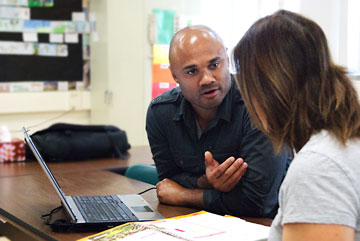
Planning a tech lesson with a 6th grade teacher at Thomas Edison Technology Magnet School in Glendale.
- Our Technology Integration Specialist comes to your school one to five times a week depending on the arrangement. Schools that want more frequency in 1-on-1 trainings increase the number of days.
- A schedule is planned on when teachers are available to meet (usually prep periods, lunch, after-school, or when their classes are at specials) and a rotation is put into place. In smaller schools, teachers can receive weekly training, but often times, they are meeting with the Integration Specialist once or twice a month.
- In the primary meetings, administrators, grade levels, or individuals map out their goals with our specialist. In many cases, the specialist demonstrates many of the latest practices from which the teachers choose.
- As meetings progress and comfort level is achieved, the one-on-one trainings turn to on-hands practice in the live classroom. This way, the teacher is supported when implementing the new integrated approach.
- Interactive whiteboards and projectors, Student Response Systems, iPads, Laptops, Document Cameras, a plethora of websites, and much more are all in our specialists' toolkit, so you show us what you have and want, and we'll make it happen.
Curricular Overview
What we teach the teachers ranges from basic computing skills to advanced integration techniques using a wide range of technologies.
What Our Teachers Are Learning:
LAPTOP
integration in the classroom
STRATEGIES
for
DIFFERENTIATION
DOCUMENT
CAMERAS
iPad
integration - apps for teachers and students
Using
WEBSITES
in class to support the curriculum
TEACHER
WEB PAGE
creation and maintainence
ONLINE
GRADEBOOKS
Using
EDMODO
as a class network
STUDENT
RESPONSE
system prep and training
LEARNING
CENTER
deployment
How to integrate
GOOGLE DRIVE
with students
FLIPPED
CLASSROOM
strategies such as Khan Academy
INTERACTIVE
WHITEBOARD
training for current class lessons
MAC
and
WINDOWS
fluency
1:1
deployment training
DESKTOP
PUBLISHING
How to create
PROJECT
BASED
LEARNING
experiences
Managing
CLOUD
and network-based storage
CLASSROOM
MANAGEMENT
software
Adding
MULTIMEDIA
content to lessons
COMMON CORE
transition aides
We Are Currently
Providing Training For:
- Egremont School (Private)
- Thomas Edison Advanced Technology Magnet (GUSD)
- Fairburn Ave. School (LAUSD)
- Kenter Canyon Charter School (LAUSD)
- Manhattan Beach Middle School (MBUSD)
- Mar Vista Elementary School (LAUSD)
- Playa Vista Elementary School (LAUSD)
- Point Dume Marine Science School (SMMUSD)
- Ross School District
- Webster Elementary School (SMMUSD)
